
The Accountant's Guide to AI OCR: Turning PDFs into Insights
Quick Answer
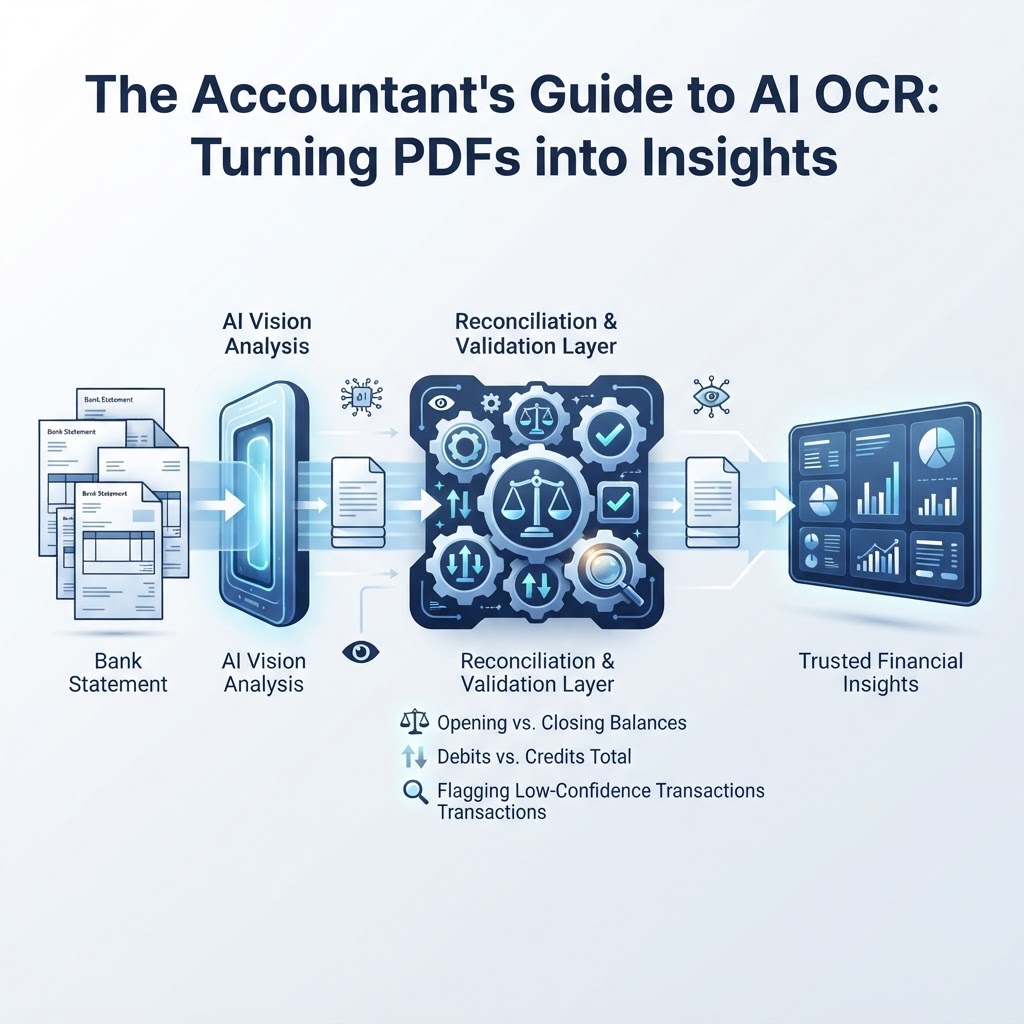
Template-based OCR fails on bank statements because it depends on fixed coordinates that break when a layout changes, while vision AI interprets document structure and meaning, so it generalizes across banks without per-institution templates. But accurate text extraction is not the same as validated data: accountants need a separate layer that checks opening/closing balances, credit and debit totals, and flags low-confidence transactions before the numbers can be trusted. The right way to evaluate an AI OCR or IDP tool is to score it on reconciliation capability first, and raw recognition accuracy second.
Why Template-Based OCR Breaks Down on Bank Statements
If you have ever tried to automate bank statement entry with an older OCR tool, you have likely hit the same wall: it works perfectly on one bank's PDF and falls apart on the next. A column shifts two pixels to the left. A bank redesigns its statement header. A new scanner introduces a slight skew. Suddenly, a tool that worked yesterday is misreading dates as amounts.
This is not bad luck. It is how template-based OCR is built. These systems rely on fixed anchor strings and page coordinates — they look for the word "Date" at a specific x/y position, then read the characters a fixed distance to the right. When a bank changes its layout, column order, or header wording, the anchor breaks and the extraction fails or silently misreads data, as detailed in Why Bank Statement PDF Parsing Fails Across Different Banks.
For accountants and bookkeepers handling statements from multiple banks, credit unions, and card issuers, this isn't an edge case — it's the daily reality. Every client relationship brings a new layout to support, and every template you build becomes a maintenance liability the moment a bank updates its PDF export format.
How Vision AI Reads a Statement Differently
Vision AI and vision-language model (VLM) based extraction take a different approach. Instead of anchoring to fixed coordinates, these models process the document holistically — interpreting visual layout and semantic meaning the way a person would, recognizing that a column of numbers under a "Withdrawals" header represents debits regardless of where that column sits on the page. This lets a single model generalize across statement formats from different financial institutions without a library of per-bank templates, as explained in OCR for Banking Without Templates.
In practice, this means the model is answering a different question than template OCR. Template OCR asks: "What text is at this coordinate?" Vision AI asks: "What is this cell, and what role does it play in this document?" That shift from coordinates to meaning is why vision-based systems tend to hold up better when a bank redesigns its PDF, switches fonts, or adds a new disclosure block.
It's worth noting that some document platforms, such as Microsoft's Document Intelligence, also offer prebuilt models specifically trained on US bank statement formats to extract account information, bank details, and transaction line items — a reminder that even specialized, vendor-maintained models are built around recognizing statement structure, not memorizing a fixed layout for every bank, per Microsoft's documentation.
Page-Aware Extraction: Keeping the Thread Across Multiple Pages
A statement with transactions spanning multiple pages creates a specific failure mode for naive extraction: a running balance that resets, a header row that gets re-captured as a transaction, or a split row that gets dropped entirely at the page boundary. Modern vision AI extraction systems are designed to maintain page-aware state — tracking where one page's running balance ends so it can confirm continuity into the next page, and recognizing repeated header rows so they aren't duplicated as transactions, as described in the same ImageToTable guide.
This matters more than it might sound. A single dropped row on page 3 of a 4-page statement can throw off a reconciliation by exactly the amount of that transaction — an error that's easy to miss if nothing is checking balance continuity across the page break.
Extraction Is Not Validation: The Distinction Accountants Can't Skip
This is the part of the workflow that gets glossed over in most "AI OCR" marketing, and it's the one accountants should care about most: extracting text successfully is not the same as confirming the data is correct.
A model can read every character on a page accurately and still hand you a transaction ledger that doesn't reconcile — because a line item was skipped, a sign was flipped, or a subtotal was double-counted. Extraction answers "what does the document say?" Validation answers "does what the document says actually add up?" Those are two separate jobs, and a resilient workflow needs both.
What Specific Validation Checks Are Required to Ensure Financial Integrity?
At minimum, a bank statement extraction workflow should check that the opening balance plus the net movement from all transactions equals the stated closing balance, as outlined in How to Extract Data from Bank Statements. If that arithmetic doesn't hold, something was missed, duplicated, or misread — and no amount of character-level accuracy fixes that, because the problem isn't legibility, it's completeness.
Beyond the balance check, a validation layer should also:
- Sum credits and debits independently and compare each total against any subtotal printed on the statement itself.
- Flag any transaction where the extraction confidence score falls below an acceptable threshold, rather than silently accepting a best guess.
- Surface the balance variance — the gap between calculated and stated closing balance — explicitly, so a reviewer knows exactly how far off the numbers are and can trace the discrepancy.
Extraction Success Doesn't Confirm Document Authenticity
It's also worth being explicit about a related but distinct risk: a clean, fully-readable extraction tells you the text was legible — it does not tell you the document wasn't altered. A successful text extraction does not prove document authenticity; separate control layers are needed to detect potential alterations or inconsistent origins, as noted in OCR in Banking: How It Works and Why Accuracy Matters. For bookkeepers processing routine client statements, this may be a lower priority. For forensic accounting and lending underwriting, where the integrity of the source document itself is part of what's being assessed, it's a separate control that extraction accuracy alone will never satisfy.
Building a Page-Aware, Resilient Extraction Pipeline
A workflow that holds up across clients and banks generally follows the same sequence found in standard Intelligent Document Processing (IDP) design: ingest, classify, extract, validate, review, and integrate, as described in Docsumo's overview of IDP. Mapped to bank statements, that looks like this:
- Ingest — accept the PDF or image as submitted, without requiring a specific scanner, resolution, or bank-specific format.
- Classify — identify which pages belong to which statement period and account, especially when a client uploads a batch of multi-month files.
- Extract — use vision-based interpretation to pull dates, descriptions, and amounts, maintaining page-aware continuity for running balances and headers.
- Validate — run the opening/closing balance check, the credit/debit totals comparison, and confidence flagging described above.
- Review — route only the flagged, low-confidence, or out-of-balance transactions to a human reviewer, rather than requiring a full manual re-check of every line.
- Integrate — export the validated data into the format or system the accountant actually works in.
Managing Low-Confidence Results: Where Human-in-the-Loop Fits
No extraction system, template-based or vision-based, is going to read a coffee-stained receipt or a badly compressed scan with full certainty every time. The practical question isn't whether low-confidence results will happen — they will — it's what the workflow does when they do.
A human-in-the-loop (HITL) step means the system flags transactions it isn't confident about and routes them for manual review, instead of either rejecting the whole document or quietly guessing. This keeps the reviewer's attention on the handful of transactions that actually need it, rather than forcing a line-by-line audit of a 40-page statement. The combination of balance-variance detection and confidence flagging is what makes HITL review targeted instead of exhausting.
Worked Example: Reconciling a Two-Page Statement
Here's an illustrative example of how this plays out (not a real client case, just a walkthrough of the logic):
Suppose a statement spans two pages. Page 1 ends with a running balance of $4,230.18 after its last listed transaction. Page 2 begins its first transaction from that same $4,230.18 base. If an extraction tool fails to carry that balance across the page break — say, because it re-reads the page 2 header as a transaction — the running balance on page 2 will be off by whatever amount that phantom row introduced.
A validation layer catches this immediately: it compares the statement's printed opening balance ($4,230.18) plus the net of all extracted transactions against the printed closing balance. If those don't match, the variance points directly to the page boundary as the likely source, and that's exactly where a reviewer should look first — rather than re-checking every transaction on both pages.
A Decision-Matrix Framework for Evaluating IDP Tools
Most vendor comparisons for OCR and IDP tools lead with character-level accuracy claims. That's the wrong starting point for financial documents, because perfect character recognition on a document that still doesn't reconcile is not a usable result. A more useful evaluation framework weights reconciliation capability above raw recognition claims. Here's a practical way to score candidate tools:
- Balance reconciliation (highest weight). Does the tool check opening balance + net transactions = closing balance automatically, and does it surface the variance when it doesn't match?
- Page continuity. Does the tool correctly carry running balances and avoid duplicating headers across multi-page statements?
- Confidence flagging. Does the tool mark specific low-confidence transactions, or does it only report a single document-level accuracy score that hides where the actual risk is?
- Review workflow. Can a reviewer correct a flagged transaction and re-validate, or does a single error require re-processing the entire document?
- Format generalization. Does the tool need a template per bank, or does it handle new layouts without manual configuration?
- Export fit. Does the validated output land where the work actually happens — your accounting software, a spreadsheet, or an API — without a manual reformatting step?
Score each candidate tool against these six criteria before asking about raw OCR accuracy. A tool that reads most characters correctly but has no balance-check or page-continuity logic will still produce ledgers that don't reconcile. A tool with strong reconciliation and flagging logic, even with the occasional misread character caught by review, is the more reliable choice for financial work.
A Practical Checklist Before You Switch Tools
Before adopting any AI OCR or IDP tool for bank statements, confirm the following:
- It can process the input formats you actually receive — scanned images as well as digital PDFs.
- It validates balances automatically rather than requiring you to total transactions manually after export.
- It flags low-confidence transactions individually, not just as a single document-level score.
- It lets you correct a flagged transaction and re-run validation without starting the whole document over.
- It exports into the format or system your workflow actually uses — CSV, JSON, or a direct integration.
Statement Flow is built around this extract-then-validate approach: it converts bank-statement PDFs and images into structured CSV or JSON data using AI-powered OCR and extraction, checks opening and closing balances and credit/debit totals, flags low-confidence transactions for review, and lets you edit transactions before exporting into QuickBooks, Xero, Google Sheets, or a direct Excel download. For firms handling statements from multiple banks, that reconciliation layer is the part worth testing first — not just how cleanly the text comes out, but whether the numbers tie out when it's done.
Frequently Asked Questions
Why do traditional OCR tools fail when bank statement layouts change?
Template-based OCR relies on fixed anchor strings and page coordinates to find data on a statement. When a bank redesigns its header, shifts a column, or changes wording, those anchors no longer line up with the right data, and the tool misreads or drops information. Vision AI avoids this by interpreting the document's structure and meaning rather than fixed positions.
How does vision AI maintain data continuity across multi-page statements?
Vision AI extraction systems can maintain page-aware state, tracking where a running balance ends on one page and confirming it carries forward correctly to the next, while recognizing repeated header rows so they aren't mistakenly captured as transactions. This prevents dropped rows and broken balance continuity at page breaks.
What specific validation checks are required to ensure financial integrity?
At minimum, a workflow should confirm that the opening balance plus the net of all transactions equals the stated closing balance, independently sum credits and debits against any printed subtotals, and flag transactions with low extraction confidence rather than silently accepting a best guess.
How should accountants manage low-confidence extraction results?
Low-confidence transactions should be flagged individually and routed to a human reviewer, rather than either rejected outright or accepted without review. This human-in-the-loop step keeps manual attention focused on the specific transactions that need it, instead of requiring a full line-by-line audit of every page.
Sources
- Why Bank Statement PDF Parsing Fails Across Different Banks — BankStatementLab
- OCR for Banking Without Templates — Checks, Statements and KYC — ImageToTable
- Document Processing Models - Document Intelligence - Foundry Tools | Microsoft Learn — Microsoft
- How to Extract Data from Bank Statements a Practical Guide — BankStatementWizard
- What Is Intelligent Document Processing (IDP)? A Guide — Docsumo
- OCR in Banking: How It Works and Why Accuracy Matters — BankStatementWizard
Related on StatementFlow
This article was produced by StatementFlow's AI-assisted editorial workflow and reviewed against sourced evidence and verified product documentation before publication.