
Closing the Capacity Gap: Automating Bank Data Ingestion During Staff Shortages
Quick Answer
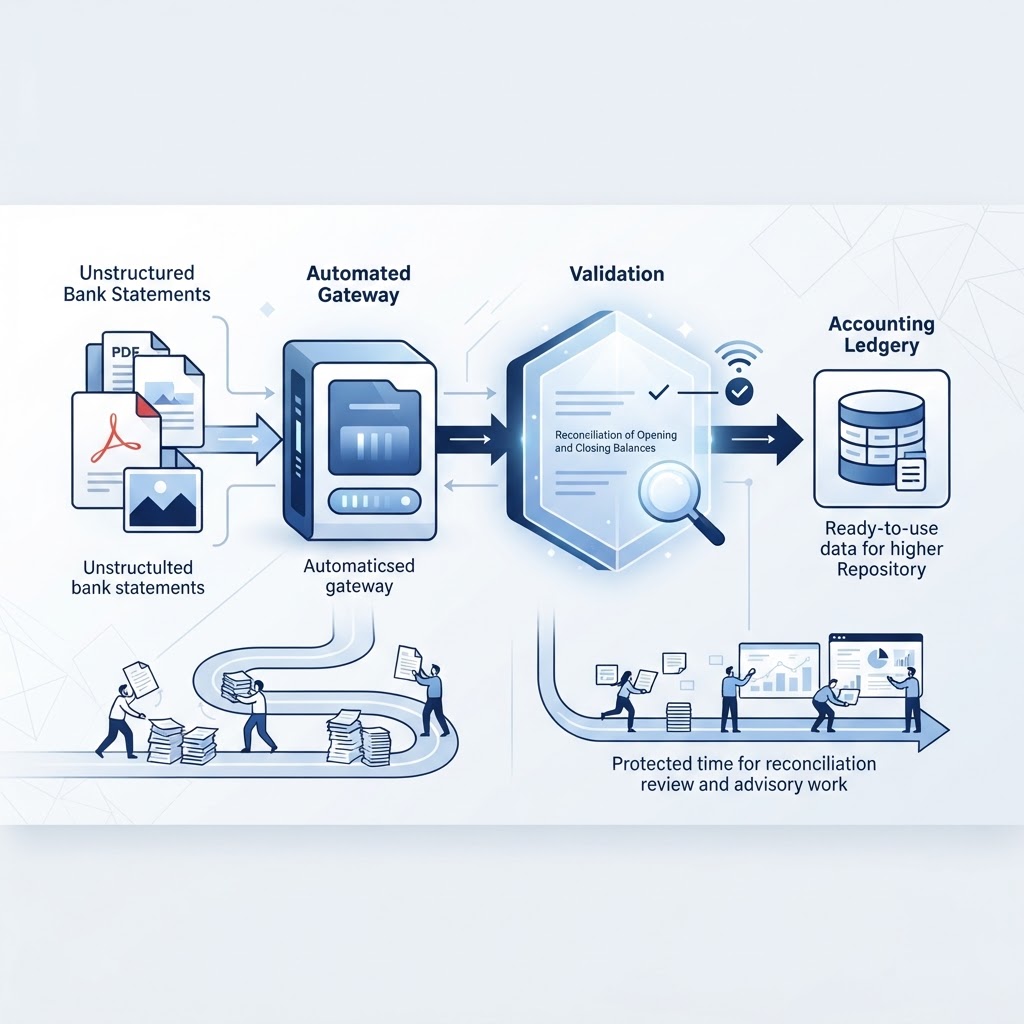
Small accounting firms facing staffing shortages can recover meaningful capacity by automating the mechanical step of converting PDF and image bank statements into structured data, rather than typing transactions by hand. This protects the time of staff who are already hard to replace — senior accountants top difficulty-to-hire surveys — so that time goes toward reconciliation review and advisory work instead of transcription. Bank statement data entry is the highest-leverage task to automate first because it is high-volume, repetitive, and a prerequisite for almost every other bookkeeping task. A validation step that checks opening and closing balances and flags low-confidence transactions before export keeps automation from introducing new errors into the ledger.
The Structural Bottleneck: Why Manual Transcription Is a Capacity Killer
Picture the last week of the month. Bank statements arrive as PDFs from several different institutions, a handful of scanned images from a client who still prefers paper, and sometimes a mix of formats from accounts opened and closed mid-year. Someone has to open every file, read each line, and type the date, description, and amount into a spreadsheet or directly into the ledger. That work has to happen before reconciliation can even begin.
This kind of transcription has always been tedious, but it used to be manageable because firms had enough staff to rotate through it. That assumption no longer holds. Senior accountants are now the hardest finance role to fill, with 43% of finance leaders naming them the toughest hire in a recent report (Thomson Reuters). When senior talent is scarce, firms don't just lose someone to run complex engagements — they lose the person who would normally supervise junior staff, which means junior staff get pulled into mechanical work that nobody has time to delegate properly.
The result is a capacity problem, not a willingness problem. Firms aren't short on effort; they're short on hours that can be spent on judgment-based work: variance analysis, client advisory, cash flow review, anomaly detection. Every hour spent retyping a bank statement is an hour not spent on the work that actually requires a trained accountant's judgment.
The shift toward automation as a response isn't speculative. 63% of finance leaders now report using AI to reduce pressure to fill open roles, up from 23% the year before (Accounting Today). That's a sharp jump in a single year, and it reflects a practical choice: if you can't hire your way out of a shortage, you look for tools that remove repetitive work from the people you already have. For accounting firms managing this across multiple clients, this is also an operational question, not just a hiring one — see For Accounting Firms.
The Technical Reality: What "Structured Data" Actually Means
Before automating anything, it helps to be precise about terminology, because loose language here causes real confusion.
- OCR (Optical Character Recognition) is the technology that reads text from an image or scanned document and converts it into machine-readable characters. A PDF bank statement, even a digitally generated one, isn't automatically usable by accounting software — OCR is the first step that turns pixels or embedded text into data a system can work with.
- Structured data means information organized into consistent fields — date, description, amount, balance — rather than sitting as unstructured text on a page. A bank statement PDF is not structured data. A CSV with one row per transaction and consistent columns is.
- Data mapping is the process of matching extracted fields to the fields your accounting platform expects. A statement might label a column "Transaction Date," while your ledger software expects "Date." Mapping resolves that mismatch.
- Bank feed refers to a direct, automated connection between a financial institution and an accounting platform that streams new transactions in near real time, without a file upload.
- Transaction reconciliation is the process of matching recorded ledger transactions against bank-confirmed activity to confirm the books are accurate — a separate step that depends on clean, structured data already being in place.
These definitions matter because accounting platforms don't accept PDFs as a native import format. Xero, for example, supports manual bank statement imports only in CSV, OFX, QIF, and QFX formats (Bankxlsx). If your source document is a PDF or a scanned image, something has to convert it into one of those formats before it goes anywhere near the ledger. That conversion step is exactly where the staffing bottleneck lives — and exactly where automation has the most leverage.
The Automation Workflow: From PDF to Ledger
A typical automated ingestion workflow breaks into a small number of discrete steps, each replacing a manual task:
- Upload or capture. A PDF or image of a bank statement is submitted to an extraction tool rather than opened and read manually.
- OCR and field extraction. The tool reads the document and identifies transaction-level fields: date, description, and amount, along with the opening and closing balances.
- Structuring. Extracted values are organized into rows and columns — the shape a ledger or spreadsheet expects.
- Export. The structured file is downloaded as CSV or JSON, or sent into a connected workflow such as QuickBooks, Xero, Google Sheets, or Excel.
Tools built specifically for this job — such as a bank statement converter — handle extraction and structuring without manual retyping.
It's worth being clear about what this workflow does not replace. Bank feeds remain useful for ongoing, day-to-day transaction syncing from supported institutions. But bank feeds cannot process historical statements, closed accounts, or institutions that don't support a direct connection (LocalExtract). That's a real gap for firms handling client onboarding, forensic reviews, loan underwriting, or any situation involving statements from a bank the client no longer uses. Document-based extraction fills that gap because it works from the PDF or image itself, independent of whether a live feed exists.
Illustrative example (not a customer case): Imagine a bookkeeper onboarding a retail client who switched banks eighteen months ago. The client has six months of statements from the old bank — a closed account with no feed available — and ongoing statements from the new bank, which does support a feed. The feed covers the new bank going forward. The old statements still need to get into the ledger for historical reporting, and that's a conversion job, not a feed job.
Platform-Specific Constraints: QuickBooks Online vs. Xero Import Limits
Even after a statement is converted into a structured file, platform-specific limits shape how that file needs to be prepared.
QuickBooks Online:
- Manual uploads are capped at 1,000 transactions per file.
- There is a file size limit of 350 KB per upload (Rex Automaton).
Xero:
- Manual CSV imports are capped at 1,000 statement lines per file.
- Accepted formats are CSV, OFX, QIF, and QFX (Bankxlsx).
The practical implication is the same for both platforms: a high-volume client — one with thousands of transactions across several accounts in a reporting period — cannot simply dump one giant file into either system. The structured output has to be split into batches that respect these caps, and each batch needs a consistent column structure so nothing gets dropped or misaligned during import.
This is another place where staffing pressure compounds the problem. Splitting large statement sets into correctly formatted, correctly batched files is itself a task someone has to do carefully if no tool handles it. Getting it wrong — mismatched columns, duplicate rows across batches, an incomplete balance range — creates reconciliation headaches that cost more time than the original transcription would have.
The Four-Stage Validation Framework: Isolating Mechanical Work from Judgment
The central risk in any automated ingestion workflow isn't speed — it's accuracy. A fast process that introduces errors into the ledger is worse than a slow one that doesn't. The way to manage that risk is to separate the workflow into stages where mechanical transcription and professional judgment never get mixed together. This is the four-stage validation framework: Extraction, Structuring, Validation, Export.
Stage 1: Extraction
This is where OCR and AI identify the raw data on the page — dates, descriptions, amounts, and the stated opening and closing balances. Nothing is interpreted yet; the goal is simply to capture what the document says.
Stage 2: Structuring
Extracted values are organized into consistent rows and columns, ready for a spreadsheet or ledger. Descriptions are kept intact rather than paraphrased, since altering wording at this stage can obscure what actually happened on the account.
Stage 3: Validation
This is the stage that protects data integrity before anything touches a ledger. A sound validation step checks:
- Whether the sum of credits and debits reconciles with the stated opening and closing balance.
- Whether there's a balance variance between what the statement claims and what the extracted transactions add up to.
- Whether any transactions were flagged as low-confidence — meaning the extraction engine wasn't fully certain of a character or amount — and need a human look before export.
Statement Flow's extraction process includes these checks as part of its workflow: opening and closing balance verification, credit and debit totals, balance variance detection, and flagging of low-confidence transactions for review, with the ability to edit and correct transactions before export (see Bank Statement OCR). This stage is deliberately the only point where a person needs to look closely — and only at the exceptions the system surfaces, not at every line. That distinction matters before moving into reconciliation, where any unresolved discrepancy becomes more expensive to trace.
Stage 4: Export
Once validation is clear — or exceptions have been reviewed and corrected — the structured data is exported as CSV or JSON, or pushed into a connected workflow.
The value of this framework is that it draws a hard line between mechanical transcription (stages 1–2, which a machine can do without judgment) and the handful of decisions that genuinely need a trained person (the exceptions surfaced in stage 3). Firms that collapse these stages — for instance, skipping validation and exporting straight from extraction — lose the error-catching benefit and risk importing bad data into a ledger, which is far more expensive to fix after the fact.
How Can Small Accounting Firms Handle Workload During Staff Shortages?
The most direct answer: remove mechanical, non-judgment tasks from the workflow first, so existing staff spend their limited hours on work that actually requires their training.
That starts with auditing where time currently goes. If a bookkeeper spends several hours a week transcribing statements by hand, that's hours not spent on reconciliation review, client communication, or advisory work — the tasks clients are actually paying for. Given that senior accountants are already the hardest role to fill (Thomson Reuters), protecting the time of the staff you do have matters more than it used to. Automating ingestion doesn't solve a hiring shortage directly, but it reduces how much hiring pressure the shortage creates — consistent with the rising share of finance leaders turning to AI tools for exactly this reason (Accounting Today).
What Bookkeeping Tasks Should Firms Automate First to Save Time?
Start with tasks that are high-volume, repetitive, and low in professional judgment. Bank statement transcription sits at the top of that list because it's purely mechanical — reading numbers off a page and typing them elsewhere — and because it has to happen before almost any other bookkeeping task, including reconciliation and categorization, can proceed.
Other strong candidates for early automation:
- Converting scanned or PDF statements into structured CSV/JSON for import, rather than retyping them line by line.
- Batching large transaction sets to fit platform limits — 1,000 lines for Xero, 1,000 transactions and 350 KB for QuickBooks Online — rather than discovering the cap mid-import.
- Flagging balance discrepancies automatically rather than manually cross-checking totals.
Tasks that should not be automated without a human in the loop: categorization decisions that affect tax treatment, client-specific judgment calls, and anything touching compliance or advisory conclusions. The goal isn't to remove the accountant from the process — it's to remove the typing.
Practical Checklist: Managing Statement Ingestion Under Staffing Pressure
- Inventory the input formats. List which clients send PDFs, images, or have active bank feeds, and identify where feeds don't apply — closed accounts, unsupported institutions, historical periods (LocalExtract).
- Separate mechanical from judgment work. Map which tasks are pure transcription (automate first) versus which require review (keep with staff).
- Confirm your output format. Check whether your platform needs CSV, OFX, QIF, or QFX, and note the file or line limits before building a batching process (Bankxlsx; Rex Automaton).
- Build in a validation checkpoint. Before any export, confirm opening and closing balances reconcile and review anything flagged as low-confidence.
- Batch large statement sets deliberately. Split files to stay under platform caps rather than discovering the limit mid-import.
- Review exceptions, not everything. Once validation is reliable, staff time should go toward flagged exceptions, not re-checking every line.
- Revisit quarterly. As client volume or staffing changes, re-check whether your batching and validation steps still match your actual caseload.
None of these steps require abandoning professional oversight. They require being deliberate about where that oversight is actually needed — and where it's being spent on typing instead.
Frequently Asked Questions
What bookkeeping tasks should firms automate first to save time?
Start with bank statement data entry: converting PDF or image statements into structured CSV or JSON data. It's high-volume, purely mechanical, and a prerequisite for reconciliation and categorization. Avoid automating categorization decisions with tax or compliance implications without a person reviewing the output.
How can small accounting firms handle workload during staff shortages?
By removing mechanical, non-judgment tasks from the workflow first — chiefly manual transcription of bank statements — so the staff you have can spend their time on reconciliation review, analysis, and advisory work instead of retyping numbers from PDFs.
Can bank feeds replace manual statement conversion entirely?
No. Bank feeds handle ongoing transaction syncing from supported institutions, but they cannot process historical statements, closed accounts, or institutions that don't support a direct connection. Document-based conversion is still needed for those cases.
What file formats do QuickBooks Online and Xero accept for bank statement imports?
QuickBooks Online accepts manual uploads of up to 1,000 transactions per file with a 350 KB file size limit. Xero accepts CSV, OFX, QIF, and QFX files, capped at 1,000 statement lines per file.
Sources
- Senior Accountants are Now Corporate America's Toughest Finance Hire, New Report Says — Thomson Reuters
- Accounting talent shortage surges — Accounting Today
- How Many Transactions Can You Import into Xero at Once? — Bankxlsx
- How to automate QuickBooks bank transaction imports from Google Drive and OneDrive — Rex Automaton
- How to Automate Bank Statement Data Entry — LocalExtract
Related on StatementFlow
This article was produced by StatementFlow's AI-assisted editorial workflow and reviewed against sourced evidence and verified product documentation before publication.