
Beyond Templates: Why Vision AI Is Replacing Static OCR for Bank Statement Processing
Quick Answer
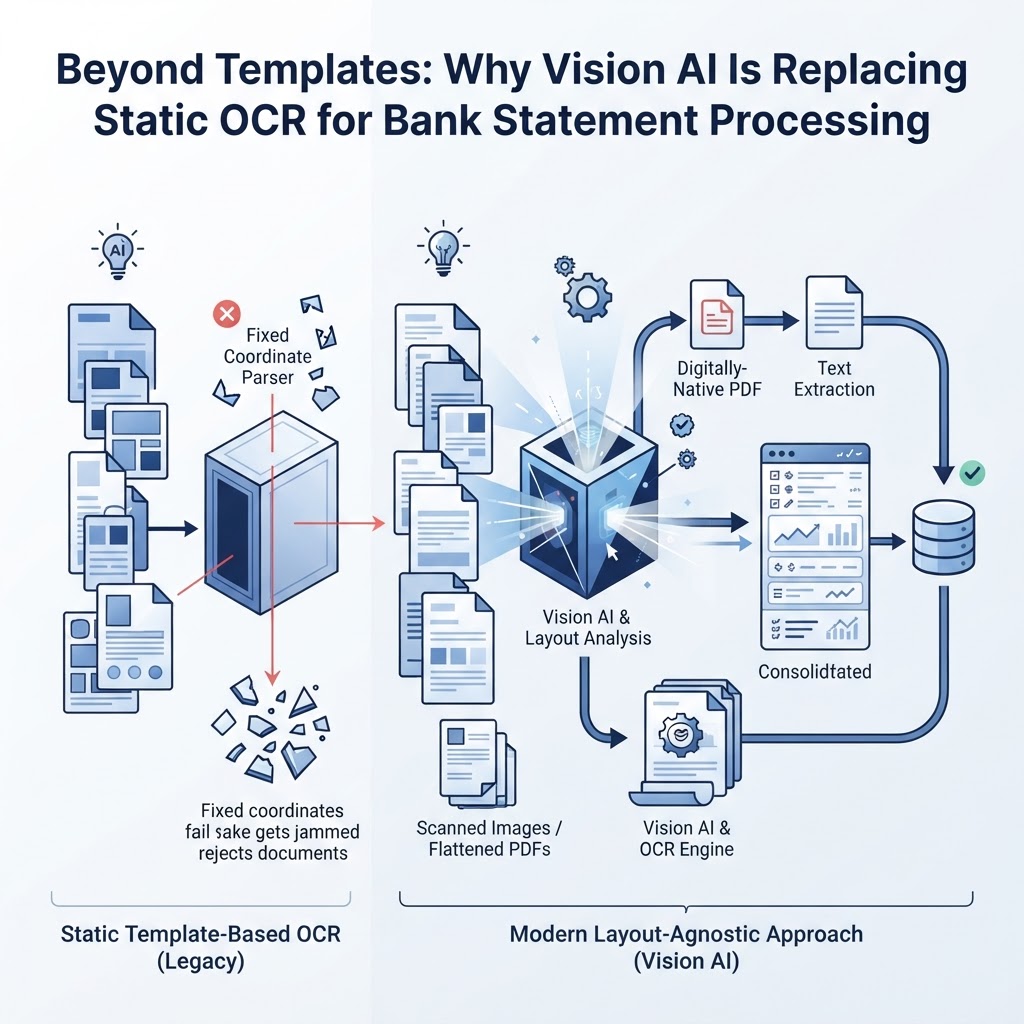
Template-based OCR fails on new bank statement layouts because it depends on fixed coordinates that break the moment a bank changes its PDF format. Layout-agnostic approaches — document layout analysis plus pretrained bank statement parsers — read structure instead of memorizing pixel positions, so they don't require a new template per bank. The right choice isn't always Vision AI, though: digital-native PDFs with selectable text are often best parsed directly, reserving OCR and Vision AI for scanned images or flattened documents.
The structural failure of template-based OCR
If you've ever configured an OCR template for one bank's statement, only to watch it fall apart the month that bank redesigns its PDF, you already understand the core problem. A template tells software, in effect, "the transaction date is always in this exact box, 2.1 inches from the left margin." That works until the bank changes its logo, adds a promotional banner, or shifts a column by a few pixels. Then the box is empty, or worse, it's pulling the wrong number.
This isn't a one-off annoyance. Template-based OCR relies on fixed coordinates, which causes failures whenever a bank statement layout changes, and banks change layouts more often than most finance teams expect — seasonal promotions, rebranding, new statement vendors, and regulatory disclosures all shift where information sits on the page. Multiply that across dozens of banks, each with its own statement design, and template maintenance turns into a part-time job nobody signed up for.
The deeper issue is that bank statements are structurally variable and don't follow a standardized schema across institutions, which means there's no universal template to begin with. You're not maintaining one template — you're maintaining dozens, indefinitely, with no guarantee the next statement won't need a new one.
Defining the stack: OCR vs. layout analysis vs. pretrained parsers
These three terms get used interchangeably, but they describe different layers of work, and understanding the difference is what makes the rest of this article useful.
OCR (Optical Character Recognition) reads pixels and converts them into characters. It answers the question "what text is on this page?" but has no idea what that text means or how it relates to anything else on the page.
Document layout analysis sits above raw OCR. It identifies structural elements — tables, headers, paragraphs, columns — and reconstructs reading order so that a date, a description, and an amount that happen to sit in a row are understood as belonging to the same transaction. Document layout analysis identifies structural elements like tables, headers, and paragraphs to build a semantic understanding of the page, and this is treated as a distinct engineering layer because layout analysis reconstructs reading order and column relationships rather than just reading characters.
Pretrained bank statement parsers go one step further. Instead of generic layout analysis, they're trained specifically on the structure of bank statements, so they recognize account numbers, transaction tables, and balance fields without being told where those fields live on any particular page. Pretrained bank statement models combine OCR with deep learning to extract structured data like account numbers and transaction details without requiring a custom template per document.
The practical takeaway: OCR reads, layout analysis organizes, and a pretrained parser interprets. A template tries to skip straight to interpretation using fixed coordinates — which is exactly why it breaks.
Why does my OCR software keep failing on new bank statement layouts?
Because it's reading position, not meaning. A coordinate-based template assumes the transaction amount will always appear at a specific horizontal and vertical offset on the page. The moment a bank adds a notice box, changes font size, or switches from one statement vendor to another, that offset shifts, and the template reads the wrong cell or nothing at all.
This is the same root cause discussed above: fixed-coordinate parsing breaks down whenever the underlying PDF format varies, and bank statement formats vary constantly because there's no shared schema across institutions. You're not dealing with a bug you can patch once — you're dealing with a design assumption (fixed layout) that doesn't hold in production.
Exception: if you process statements from a single bank that genuinely never changes its PDF template, a coordinate-based approach can work indefinitely. The failure mode is specific to environments where statements come from multiple banks, or from one bank whose format evolves — which describes most bookkeeping, lending, and fintech workflows.
Is there a way to process bank statements without setting up templates?
Yes. Layout-agnostic processing — the combination of document layout analysis and a pretrained bank statement parser — is built specifically to avoid per-bank template setup. Instead of memorizing coordinates, it identifies the role each piece of text plays (transaction row, header, balance field) based on structural patterns common to bank statements generally, not the pixel position on one specific layout.
This is possible because pretrained models are trained to recognize bank statement structures like account numbers and transaction details without a custom template and because layout analysis builds a semantic understanding of tables and columns rather than relying on fixed positions. The practical effect is that a new bank's statement doesn't require a new template — it requires the same parsing logic applied to a different layout, because that logic was never dependent on the layout in the first place.
How does Vision AI improve bank statement extraction?
Vision AI improves extraction by separating geometric role (where something sits on the page) from logical role (what it means in the document). A template conflates the two: position is meaning. Vision AI and layout analysis treat them separately, so a transaction amount is identified as "the amount associated with this transaction row" regardless of whether it sits at column position 400 or 480.
This matters because layout analysis is explicitly built to reconstruct reading order and column relationships — it's solving the geometric-to-logical mapping problem directly, rather than assuming the mapping is fixed. That's the architectural reason layout-agnostic systems tolerate new bank formats that break coordinate templates.
Important exception: Vision AI is not automatically the better choice for every document. For digital-native PDFs — files with selectable, embedded text — parsing the text layer directly avoids the uncertainty inherent in visual OCR interpretation. Running a digital-native PDF through image-based OCR introduces recognition error that simply doesn't exist if you read the embedded text directly. This distinction is the basis of the decision framework below.
The decision framework: native parsing vs. Vision AI
This is the question most vendor marketing skips: when should you use Vision AI versus simpler native text extraction? The answer depends on one file characteristic, not on which tool sounds more advanced.
Step 1: Determine if the file is digital-native or scanned
- Digital-native PDF: generated directly by the bank's system (not scanned). Text can be selected and copied in a PDF viewer.
- Scanned or image-based PDF: originated from a physical scan, a screenshot, or a photo of a printed statement. Text cannot be selected; the "text" is actually a picture of text.
Step 2: Route based on that characteristic
- If digital-native: extract the embedded text layer directly, then apply layout analysis to organize it into transaction rows. This avoids the recognition uncertainty of OCR entirely, since reading the text layer sidesteps the visual interpretation step altogether.
- If scanned or image-based: Vision AI and OCR are necessary, because there is no embedded text to read — the system has to recognize characters from pixels first, then apply layout analysis and a pretrained parser on top of that output.
Worked example (illustrative)
Imagine a bookkeeper receiving two statements in the same week:
- Statement A is downloaded directly from a bank's online portal as a PDF. Opening it in a browser lets you highlight and copy the account number. This is digital-native. The optimal path is direct text extraction plus layout analysis — no OCR guessing required.
- Statement B is a scanned copy forwarded by a client who photographed a paper statement with a phone. There's no selectable text; it's an image. This file needs OCR and Vision AI-based layout analysis, because character recognition has to happen before anything else.
Treating both files identically — running everything through Vision AI, or assuming everything is digital-native — wastes either accuracy (on Statement A, unnecessary OCR interpretation) or feasibility (on Statement B, which has no text layer to extract). The decision framework exists precisely to route each file down the path suited to its actual structure, rather than defaulting to whichever technology marketing teams promote as universal.
Practical workflow: from intake to validation
Once a file is routed correctly, a layout-agnostic workflow generally follows these stages:
- Intake and classification — determine digital-native versus scanned, as above.
- Text or character recognition — direct extraction for digital-native files; OCR for scanned ones.
- Layout analysis — reconstruct which characters belong to which table, row, and column, rebuilding the transaction structure regardless of the original coordinate layout.
- Structured extraction — a pretrained bank statement parser maps recognized text into fields: transaction date, description, amount, running balance.
- Validation — check the extracted data against internal consistency rules: do credits and debits sum to the stated totals, does the opening balance plus activity equal the closing balance, and are any individual transactions flagged as low-confidence and needing review. Statement Flow performs this validation step as part of its Bank Statement OCR and AI Data Extraction process, flagging balance variances and low-confidence transactions before export rather than after a discrepancy surfaces in the ledger.
- Correction and export — transactions that failed validation get corrected manually, then the dataset is exported as CSV or JSON, or pushed into a connected accounting workflow.
Exception-handling checklist
Even a layout-agnostic workflow runs into edge cases. Work through this list when a statement doesn't extract cleanly:
- Multi-page statements with repeated headers: confirm the layout analysis step is treating each page's header as a label, not as a new transaction row.
- Merged or joint account statements: check whether transactions from two sub-accounts are being combined into one table; separate them before validation.
- Low-confidence transactions: don't override a low-confidence flag without checking the source image or text directly — the flag exists because the system itself detected ambiguity.
- Balance mismatches after extraction: verify the opening balance, closing balance, and the sum of credits and debits against each other. A mismatch usually means a transaction was missed or duplicated, not that the math is wrong.
- Scanned statements with poor image quality: re-scan or request a clearer copy where possible; OCR accuracy depends on image clarity, and no layout analysis layer can recover information that was never legible to begin with.
- Non-standard currency symbols or number formats: confirm decimal and thousands separators are being interpreted correctly, particularly for statements from international banks.
- Handwritten annotations or stamps: treat these as noise to be excluded from structured extraction rather than data to be parsed; flag them for manual review instead.
Where this fits into a bookkeeping or lending workflow
For bookkeepers, accountants, and fintech teams processing statements from more than a handful of banks, the maintenance cost of templates compounds quickly — every new client, every new bank, every layout refresh is another support ticket. A layout-agnostic approach, paired with validation checks and a correction step before export, removes that maintenance burden without pretending accuracy is guaranteed; it still requires a human to review flagged transactions.
Statement Flow converts bank-statement PDFs and images into structured CSV or JSON data using this kind of AI-powered extraction, and supports transaction editing before export, document history for re-downloading prior conversions, and direct export into QuickBooks, Xero, Google Sheets, or Excel/CSV. Teams working across many banks and formats can see how this applies to their specific workflow via Bank Statement Converter and For Bookkeepers.
Frequently Asked Questions
Why does my OCR software keep failing on new bank statement layouts?
Because it's relying on fixed coordinates rather than structural understanding. Template-based OCR assumes a transaction amount always sits at the same position on the page, which breaks whenever a bank changes its PDF format — and bank statement formats vary across institutions with no shared schema, so failures are common, not occasional.
Is there a way to process bank statements without setting up templates?
Yes. Document layout analysis combined with a pretrained bank statement parser identifies structural elements like transaction tables and account fields without needing coordinate-based templates for each bank, because it's trained to recognize bank statement structure generally rather than one specific layout.
How does Vision AI improve bank statement extraction?
Vision AI separates a document element's position on the page from its meaning in the document, so a transaction amount is recognized as part of a transaction row regardless of where it sits. This makes extraction tolerant of layout changes that would break a fixed-coordinate template. It's most valuable for scanned or image-based statements; digital-native PDFs are often better served by direct text extraction.
Should every bank statement be processed with Vision AI?
No. Digital-native PDFs with selectable text can be parsed directly from the embedded text layer, which avoids the recognition uncertainty inherent in visual OCR. Vision AI and OCR are necessary specifically for scanned or image-based statements, where no text layer exists to read directly.
Sources
- Why Bank Statement PDF Parsing Fails Across Different Banks — BankStatementLab
- Document layout analysis - Document Intelligence - Foundry Tools | Microsoft Learn — Microsoft
- Bank statement US extraction model - Document Intelligence - Foundry Tools | Microsoft Learn — Microsoft
- How Bank Statement Data Extraction Works in Production — Invofox
- Bank Statement Extraction API: A Developer Guide — Invoicedataextraction.com
Related on StatementFlow
This article was produced by StatementFlow's AI-assisted editorial workflow and reviewed against sourced evidence and verified product documentation before publication.